When many teams work on internal linking, they take a lot of action, but the results are often mediocre.
The most typical scenario looks like this:
- Numerous links are added inside articles.
- Navigation menus and category pages are stuffed with internal links.
- Even the footer and "related posts" sections are heavily linked.
Yet, a few weeks later, the target page hasn't shown any noticeable improvement. The reason is usually not that "internal links don't work," but that the internal links weren't designed around the roles of the target page. If every page blindly links to every other page, the result isn't a supportive structure—it's a web with no clear focus.
For a platform like SeoSpeedup that hosts a mix of a blog, tools, and service pages, it is even more critical to treat internal linking as a "thematic division of labor" system, rather than simply "adding a few more anchor texts."
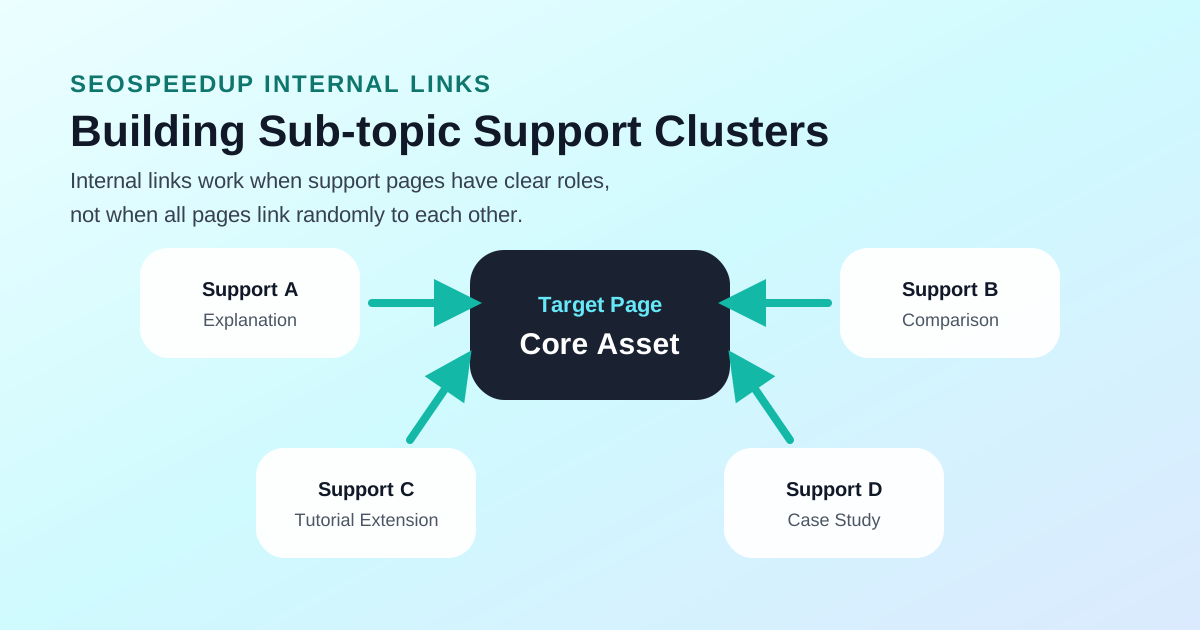
Diagram: The true purpose of internal linking is not to make pages "know" each other, but to help search engines and users understand "who is the main page and who is supporting it."
Why Do Many Internal Linking Efforts Fail to Move the Needle?
Because the problem for most sites isn't a "lack of links." It's a "lack of structure."
Here are the 4 most common reasons I see:
1. No Clear Target Page
If you can't clearly articulate which specific page a cluster of content is ultimately supposed to push, your internal links will likely just scatter authority.
2. Support Pages and Target Pages Are Addressing the Exact Same Topic
These types of internal links aren't supporting; they are exacerbating keyword cannibalization. Search engines struggle to understand which page you actually want to rank as the primary asset.
3. Anchor Texts Only Focus on "Keyword Coverage" Regardless of Context
An anchor text isn't better just because it looks exactly like a target keyword. First and foremost, it must fit naturally into the sentence. Secondly, it must clearly convey the specific problem the destination page solves.
4. Links Are Clickable, But Not Terribly Crawlable or Understandable
Google's official documentation on internal linking and crawlability is extremely straightforward:
Simply put, a link is more than just a visual element. It must:
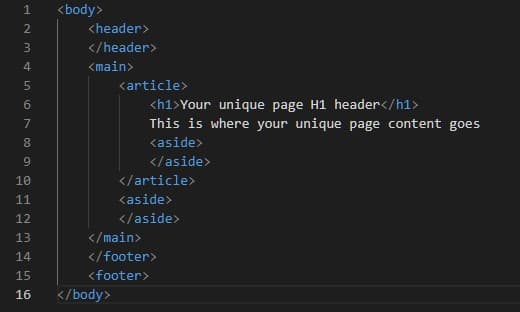
- Be deployed using a parser-friendly HTML
<a>tag. - Resolve to a real, valid URL.
- Live on a page that actually has a chance of being discovered itself.
A More Reliable Internal Linking Strategy: Choose the Target Page First, Then Design the Support Pages
For sites like SeoSpeedup, I highly recommend flipping the traditional process:
Step 1: Decide "Who is the Winner?" for This Content Cluster
You must first clarify:
- Out of this cluster of content, which specific page do we ultimately want to rank higher?
- Is this page a core tool page, a commercial service page, or a pillar blog guide?
If this step is skipped, all subsequent linking efforts are just performative busyness.
Step 2: Support Pages Must Take On Distinct Roles
A healthy content cluster usually contains:
- One Target Page (The primary asset).
- Several explanatory support pages (e.g., definitions, basic guides).
- Several comparison or case-study support pages.
If every support page discusses the exact same central theme as the target page, they aren't offering support—they are fighting the target page for the same topical territory.
Step 3: Prioritize Clarity in Anchor Texts Before Prioritizing Keyword Coverage
I recommend that your anchor text first answers:
Why should the reader click this link right here, right now?
Instead of:
Can I force my exact-match keyword into this sentence one more time?
A natural, explicit anchor text that matches the immediate context is generally far more reliable than awkwardly shoehorning SEO keywords.
How to Check if Your Internal Links Are Actually Functioning
1. Check if the Target Page Is Fundamentally Flawed
The SEO Analysis Tool is critical for initially confirming:
- Whether the target page is actually worth pushing.
- Whether the on-page structure and meta tags have drifted off-topic.
- Whether the page suffers from more fundamental technical blockers (like indexing issues).
If the foundation of the target page is weak, pouring internal links into it will rarely save it.
2. Check if Support Pages Are Passing the Correct Thematic Signals
You don't need complex spreadsheets for this step. Just evaluate:
- Are the support pages genuinely addressing distinct sub-topics?
- Are some pages just repeating the main topic under a slightly different title?
- Are all the links routing authority back efficiently to the designated main page?
If you suspect your cluster is already eating its own keyword visibility, review this guide first:
3. Exercise Restraint if the Target Is a Tool or Service Page
The most common trap for commercial tool pages and service pages isn't a lack of links; it's that over-eager content teams drag them down by turning them into "talk about everything" hybrid articles.
A better routing system:
- Support Pages handle the heavy lifting of explanation and education.
- Target Pages handle the transaction and the core action.
- Internal Links act as the bridge, funneling users and thematic relevance from the former to the latter.
An Execution Checklist for Internal Link Division of Labor
| Page Type | Ideal Role | Linking Direction |
|---|---|---|
| Core Tool Page | Main Destination | Receives links from support pages |
| Core Service Page | Main Destination | Receives links from blog guides and case studies |
| Tutorial Page | Explanation & Education | Sends links up to the main page |
| Comparison / FAQ Page | Provides Judgment Criteria | Sends links up to the main page |
| Case Study Page | Provides Proof and Results | Sends links up to the main page |
If you treat every page as if it's the ultimate destination to be pushed, this entire matrix breaks down.
Conclusion: The Goal Isn't "Adding" Links, It's Knowing "Who You Are Adding Them For"
The prerequisite for internal links actually generating a ranking lift is:
- A clearly defined target page.
- A clean division of labor among support pages.
- Anchor texts that are natural and contextually understandable.
- Links that are actually crawlable and discoverable.
For a platform like SeoSpeedup, a much more stable sequence is:
- Use the SEO Analysis Tool to verify the target page is legally sound and logically structured.
- Break down the roles of your support pages by sub-topic.
- Ensure support pages consistently route semantic signals back to the target page, rather than wildly linking to each other.
- If necessary, use the Sitemap Generator and main navigation to ensure the support pages themselves can actually be found by crawlers.
If you've been aggressively building internal links lately but feel like you're spinning your wheels with mediocre results, the problem probably isn't that you "haven't added enough"—it's that you haven't decided exactly who the links are supposed to serve.
Recommended further reading: