Many pages lose the SEO battle before the first word is even written. They don't fail because the content is poor; they fail because the team chose the wrong page type.
The most common scenarios look like this: A keyword that desperately needs a fast, interactive Tool Page gets buried under a 3,000-word blog post. A heavily commercial keyword meant for a Service Page is awkwardly stuffed into a generic article. And queries where users just want a simple explanation end up routing to a hard-sell checkout page. In the end, the page fails to satisfy the user's search intent and creates devastating friction for their next action.
If you are preparing to target a new batch of keywords, the most important first step is not writing compelling headlines. It is making a structural decision: Should this keyword be captured by a Blog Page, a Tool Page, or a Service Page?
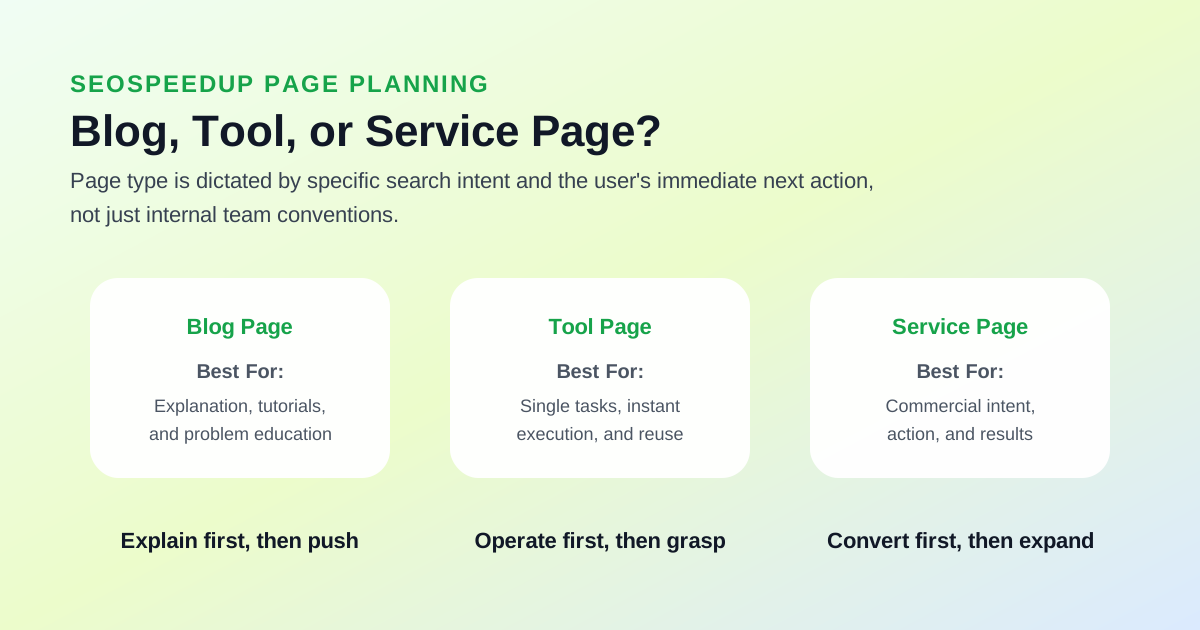 The key to determining page types isn't your team's publishing habits—it's matching the user's search intent with their logical next action.
Why Choosing the Wrong Page Type Destroys Your SEO
Because search intent and page architecture must work as a unified system.
Consider these frustrating mismatches:
- The user searches for "how to fix...", and you hand them a purely commercial pricing page.
- The user searches for "online generator", and you hand them a dense theoretical essay.
- The user searches for "seo optimization agency", and you hand them a DIY tutorial.
This fundamental misalignment immediately damages three critical SEO pillars:
- Click-Through Rate (CTR): The title looks correct in the SERPs, but upon clicking, the user instantly realizes the format is wrong.
- Dwell Time & Conversion: The page architecture does not facilitate the user's logical next step, leading to high bounce rates.
- Sustained Authority: Search engines are highly adept at identifying format mismatches. They will not maintain a high ranking for a tutorial page when the query clearly demands a software tool.
How I Distinguish Between Blogs, Tools, and Service Pages
The Blog Page
Best suited for capturing:
- Step-by-step tutorials
- Background explanations and conceptual queries
- "A vs. B" comparison research
- Pre-decision information gathering (Top of Funnel/Middle of Funnel)
The defining characteristic here is that the user is not necessarily ready to act. They want to understand:
- What exactly is this?
- Why is it important to my business?
- How should I evaluate my options?
The Tool Page
Best suited for capturing:
- Online checkers and auditors
- Generators and calculators
- Immediate execution queries
- Reusable, single-action tasks
When users search for these keywords, they don't want to learn a concept; they want to execute a task.
For example, look at these typical SeoSpeedup entry points:
The Service Page
Best suited for capturing:
- Done-for-you, agency, or outsourcing queries
- Result-oriented commercial queries
- Needs where the user explicitly wants someone else to handle the execution (Bottom of Funnel)
For SeoSpeedup, the prime example of this type is:
A user lands on a service page not to grasp a theory, but to find out:
- Exactly what outcomes can you deliver for me?
- Is this a fit for my budget and industry?
- How do we start the onboarding process right now?
3 Questions to Determine the Perfect Page Type
Before writing content for a keyword, ask your team these three questions:
1. Is the user here to "Understand" or to "Execute"?
If they want to understand, build a Blog Page. If they want to execute an action quickly, build a Tool Page. If they want to hire an expert to execute it for them, build a Service Page.
2. What is the most logical 'Next Action' after this query?
- If it's "Read more related research": Blog.
- If it's "Input a URL and click scan": Tool.
- If it's "Submit a project brief": Service.
The desired next action dictates the UI and architecture of the page.
3. Does our site already have a page fulfilling this role?
This is crucial. Often, the issue isn't whether a page is necessary, but whether it is merely duplicating an existing asset. If you already have a functional Tool Page for a query, and you want to write a tutorial—ask yourself: Should this tutorial be a secondary Support Page rather than competing for the main keyword?
The SeoSpeedup Workflow for Establishing Page Types
I highly recommend breaking this decision process into three manageable steps:
Step 1: Use /seo to Audit Existing Page Roles
If you already have a page ranking for a term, plug it into the SEO Analyzer to verify its current alignment:
- Is the Title unknowingly promising a Tool, while the Body delivers a Blog post?
- Does the page structure lean too heavily toward a tutorial when it should be commercial?
- Do the technical tags and content accurately reflect the same persona?
This step prevents the common mistake of "failing to realize an existing page has slowly drifted totally out of its intended role."
Step 2: Test Angles with /ai/title-generator
The Title Tag is arguably the strongest signal of a page's type. Run your keyword through the AI Title Generator. Look past the catchy phrasing and evaluate the fundamental angle:
- Do these titles naturally sound educational?
- Do they sound active and tool-oriented?
- Do they sound transactional and service-oriented?
If a keyword consistently generates titles demanding immediate action ("Generate X Now", "Free Validator"), it heavily implies building a Tool Page.
Step 3: Solidify the Role with /ai/tdk-rewrite
Once the page architecture is decided, lock in the signals using:
By this stage, your Title, Description, and Keyword targeting will be incredibly stable because you are no longer writing for a vague, generic page; you are optimizing for a rigorously defined role.
The Most Common Trap: Writing Content First, Assigning Roles Later
The standard (and heavily flawed) workflow for many teams is:
- Have an AI generate a massive article around a keyword.
- Decide later if it should be published in the blog.
- If it looks "commercial enough," carelessly staple a pricing table on it and call it a Service page.
This sequence guarantees that your page roles will constantly float and drift, confusing both users and search engines.
The correct, stable sequence is exactly the opposite:
- Definitively judge the optimal Page Type.
- Wireframe the Page Structure/UI based on that type.
- Finally, write the content and generate the precise SEO tags.
An Actionable Page Type Decision Matrix
| Target Keyword | User's Primary Goal | Optimal Page Type | In-Site Next Action |
|---|---|---|---|
| How to run an SEO audit | Understand the process first | Blog Page | Internal link to the /seo tool |
| canonical tag generator | Complete a specific task immediately | Tool Page | Direct interface interaction |
| keyword ranking optimization service | Find someone to deliver results | Service Page | Direct to the /optimize checkout/form |
This simple matrix helps teams avoid catastrophic directional errors before wasting hours on content creation.
Conclusion: Determine the Type, Then Write the Words
Deciding whether a keyword belongs to a Blog, a Tool, or a Service page shouldn't rely on gut feeling. It must rely on:
- Search Intent
- The logical Next Action
- The clarity of existing pages in your site's architecture
For SeoSpeedup users, the optimal sequence is:
- Use the SEO Analyzer to check if your existing pages have a clear, non-conflicting role.
- Use the AI Title Generator to explore the most natural angle for the query.
- After committing to a Page Type, use the AI TDK Rewrite Tool and Meta Tag Generator to lock your SEO signals into place.
If your team is preparing to expand into a new keyword cluster, enforce this Page Type classification before anyone drafts a single outline.
Keep reading to master your site architecture: