Many pages don't suffer from a lack of content—they suffer from titles and descriptions that promise the wrong thing.
It’s a gap we see every day: keywords are stuffed in, but the user can’t actually tell what the page solves. Or worse, the title is "catchy" but the body text fails to deliver on the promise. The former kills your click-through rate (CTR); the latter kills your dwell time and trust. Both pull your rankings into the dirt.
At SeoSpeedup, we don't treat TDK (Title, Description, Keywords) as an isolated task. It’s part of a unified workflow. You have to decide if a page is a tool, a service, a blog, or a category hub before you decide which tool to use.
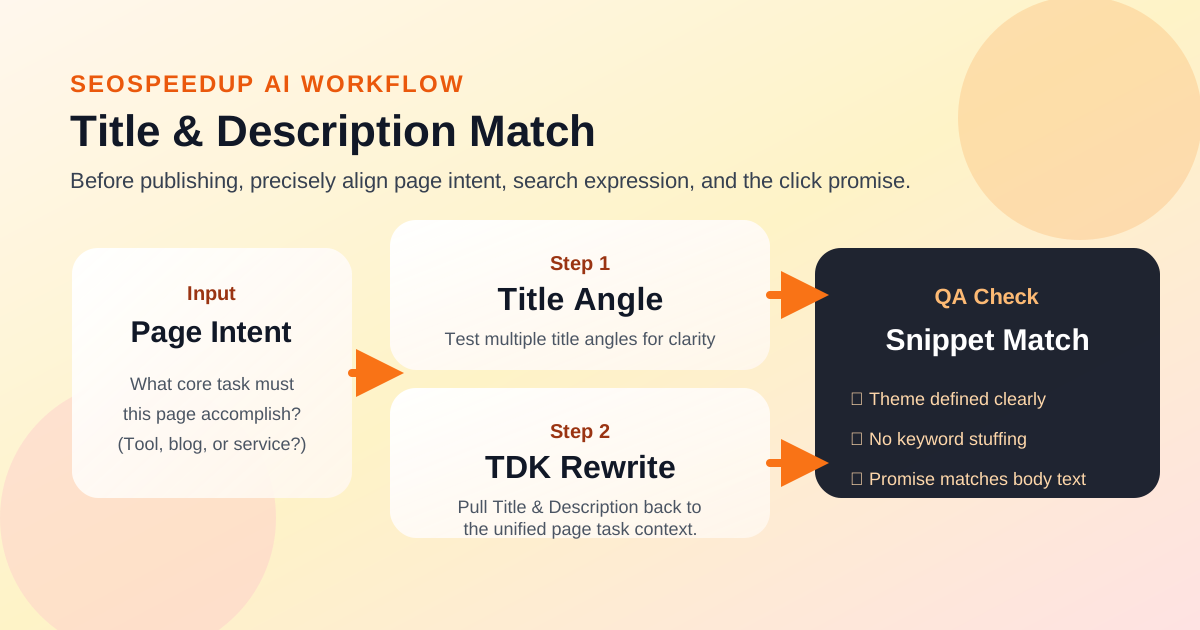 TDK isn't just text; it's the output of your page's role, search intent, and the user's expectation.
Why Titles Fail: Misunderstanding Your Page’s Job
Before you touch your <title> tag, ask yourself:
- What specific search intent is this page meant to catch?
- What is the #1 problem the user wants to solve when they click?
- Is this a tool, an article, or a sales page?
If you don't answer these first, no amount of AI-generated prose will save you. You'll end up with "pretty" sentences that don't convert.
- Tool pages need to lead with functionality and use-cases.
- Service pages need to lead with results and target audience.
- Blog posts need to present the problem and the path to the solution.
Which SeoSpeedup Tool Should You Use?
Don't just open a random generator. Choose based on your current roadblock:
| Page Type | Priority Focus | Recommended Tool |
|---|---|---|
| Tool Pages | Functionality, Problems Solved | AI TDK Rewrite |
| Blog Posts | Theme angle, Click intent | AI Title Generator |
| Service Pages | Outcomes, Use Cases | AI TDK Rewrite |
| Brand New Pages | Basic SEO Meta Structure | Meta Tag Generator |
The "Steady" TDK Optimization Sequence
Step 1: Reality Check with the SEO Analyzer
I always start with the SEO Analyzer. I want to see if the current page is "misaligned" with its target:
- Is the Title totally disconnected from the actual text?
- Does the H1 header talk about the same thing as the title?
- Is it just a mess of keyword stuffing?
Step 2: Use the Title Generator for "Angles"
For blog posts, the problem usually isn't "writing the title"—it's finding the right perspective.
Use the AI Title Generator to brainstorm directions, not to find a final copy. Look for:
- Does it put the main topic first?
- Does it address a specific burning question?
- Is it clickbait, or does the article actually back it up?
If a title generates a click that results in an immediate bounce, you’ve just poisoned your brand's trust.
Step 3: Align with AI TDK Rewrite
This is the workhorse for service and tool pages. You aren’t looking for "fancier words"; you’re looking for alignment:
- What does the Title say?
- What does the Description add?
- What does the actual content deliver?
A rock-solid result usually looks like this:
- Title: Subject first, then Result or Scenario.
- Description: Doesn’t repeat the Title; it adds value and identifies the target user.
Step 4: Final Structure Polish
Once the logic is set, I head back to the Meta Tag Generator for a "sanity check." I check if tags are missing, if the site template is failing to output certain fields, or if characters are getting cut off.
The 4 Deadliest TDK Sins
- Keywords as the Master, User as the Slave: Titles that sound like they were written for a robot. If a human can't read it naturally, don't use it.
- The Bait-and-Switch: Promising a solution in the title but providing a generic "about us" intro in the text.
- The "Echo" Description: Simply repeating the title in the description box. Use that space to give the user a reason to click.
- One Size Fits All: Using the same tone for a technical tool and a luxury service page.
The Conclusion: Define the Role, Then the Title
A Title and Description aren't about character counts—they’re about decisions.
The sequence that works:
- Identify the page role.
- Find the angle with the Title Generator.
- Align the TDK with the Rewrite Tool.
- Verify the technical output with Meta Tags.
If you’re currently mass-updating a site, or if you feel like your great content is being ignored, start here. Stop guessing.