Most old articles aren't completely worthless. They're just stuck at a version that no longer competes.
Here's what that usually looks like:
- The title is anchored to an outdated angle nobody searches for anymore
- The body structure no longer matches today's dominant search intent
- Someone patched in a few AI paragraphs months ago but never quality-checked the result
- The content got updated, but the Title tag, Description, canonicals, and internal links still broadcast the old promise
These pages are the most dangerous to mishandle. Some teams nuke them and start from scratch. Others just bump the date and pray. A few will literally duplicate the old post into a brand new URL — creating a cannibalization nightmare. The smarter play? Systematically evaluate whether the page is still worth keeping, then methodically refresh the title, body, AI traces, and on-page signals one layer at a time.
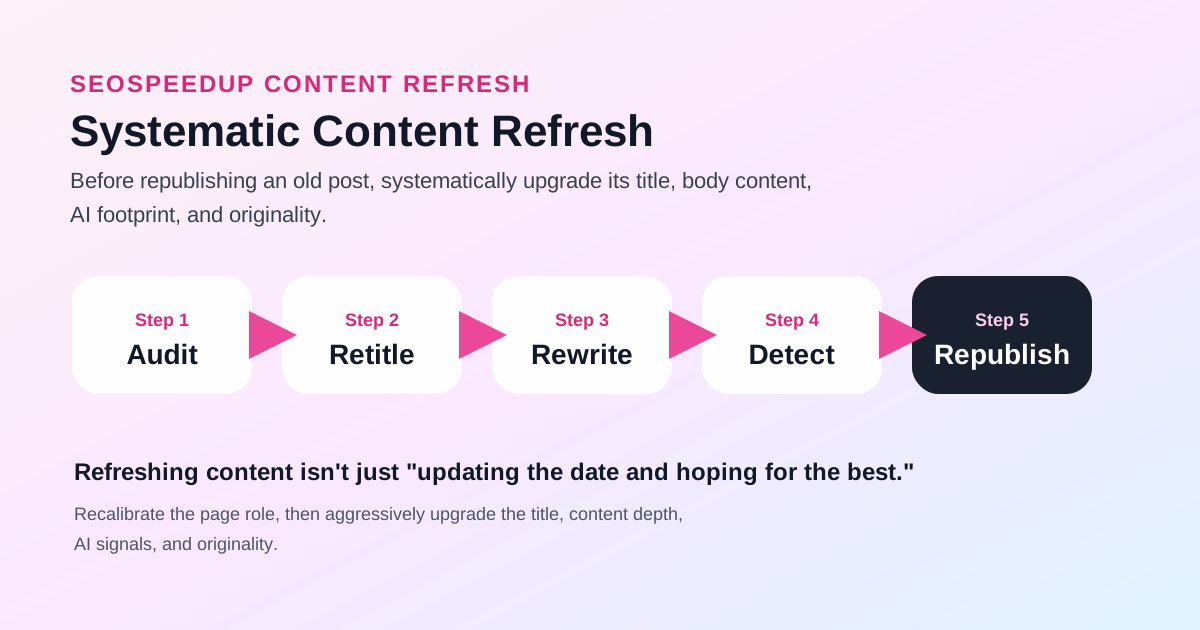 The worst content refresh strategies are "change almost nothing" and "burn it all down." The right approach: verify the page's role first, then surgically update title, body, detection risk, and page signals in sequence.
Why Do Some Old Articles Get "Some Traffic But Never Break Through"?
I see four recurring patterns across virtually every site audit:
1. The Topic Is Still Relevant, But the Angle Is Stale
The core problem the article addresses still exists. But the specific sub-questions users care about today have shifted, and the title plus opening paragraph are still speaking to last year's conversation.
2. The Page Has a Foundation, But Lacks Density
The original piece has direction and even some index presence, but it's missing:
- Clearer decision criteria that modern searchers expect
- Updated case studies or execution paths
- A structure that actually reflects how people search for this topic right now
3. AI Helped Write It, But Nobody Checked the Output
Some articles got AI-generated paragraphs bolted on during a previous update sprint. But nobody verified whether:
- The title had drifted off-target
- The new sections sounded suspiciously templated
- The refreshed content now uncomfortably overlapped with another page on the same site
4. The Content Changed, But the Page Signals Didn't Follow
The body text was substantially rewritten, but the Title tag, Meta Description, canonical URL, and internal link anchors still point to the old framing. The page looks "refreshed" from a CMS perspective, but search engines and users still see the old contract.
A More Reliable Content Refresh Workflow
Step 1: Decide Whether This Page Deserves to Stay
Not every old article earns continued investment.
Before touching a single sentence, ask yourself:
- Is this topic still something our site should own?
- Is this specific URL still the best candidate to rank for this keyword?
- Has a newer, stronger, more clearly defined page already taken over this role?
If the answer to any of these is "no," the correct move is to merge, redirect (301), or retire the page — not pour more hours into it.
If you suspect this old page is already fighting another page on your site for the same keyword, start here:
Step 2: Fix the Title First — Don't Jump Straight Into Rewriting the Body
When refreshing old content, I almost never start with the body text.
The logic is simple: if the title and angle aren't locked in first, every paragraph you rewrite will still be serving the old question. You'll waste hours polishing text that's aimed at the wrong target.
Start with:
Focus on:
- Has the primary search angle shifted since this was published?
- Does the current title still accurately promise what the body delivers?
- Does the click expectation match the actual content experience?
Step 3: Rewrite Only the Weakest 20-30% of the Body
Once the title direction is set, then move to the body.
I strongly advise against rewriting the entire article from scratch. Instead, surgically target the weakest sections:
- Is the opening too slow to hook today's readers?
- Are the key decision paragraphs empty or vague?
- Does the FAQ section just repeat what's already above?
- Which paragraphs are obviously filler from the original era?
The best tool for this kind of targeted refinement:
It's designed for "distilling and strengthening existing content," not for generating a fresh article from a blank page.
Step 4: After Patching, Check for Machine Traces and Duplication Risk
This is the step most teams skip entirely during a content refresh. And it's the one that bites hardest.
Old articles are rarely written in a single session. They're layered:
- The original human draft
- AI paragraphs added months later
- A FAQ section tacked on during a "content expansion" sprint
Without running detection, you'll end up with a page that reads fine on the surface but has individual paragraphs that scream "language model output" — or worse, sections that are uncomfortably close to content elsewhere on the web.
Run these checks in order:
These tools serve different purposes:
- The Detector flags "machine-generated feel" (linguistic patterns)
- The Plagiarism Checker flags "similarity risk" (content overlap with external sources)
If you want to formalize this into a standard pre-publish gate, read:
Step 5: Finally, Verify That the Landing Page Signals Still Make Sense
Content refresh isn't just about rewriting text.
Before you hit "Publish" on the updated version, run the full page through:
Check whether the page-level signals need updating too:
- Title Tag and Meta Description (do they match the new angle?)
- Page structure and heading hierarchy
- Canonical URL (still pointing correctly?)
- Internal link anchors pointing to this page (still using the right keywords?)
If you rewrote the body but left the page signals frozen in time, you did half the job.
Should You Request a Recrawl After a Content Refresh?
If the refresh involved substantive changes — a new title angle, rewritten core paragraphs, restructured sections — it's worth nudging Google to re-evaluate. Use the URL Inspection tool in Search Console to request indexing. Google's official guidance:
But keep expectations realistic: submitting a recrawl request is not a ranking button. Whether the page improves depends entirely on whether the refresh genuinely made the content more relevant and the page role clearer.
A Content Refresh Decision Matrix for Your Team
| Page | Keep It? | Fix First | Tools Needed | Validation Metric |
|---|---|---|---|---|
| Old Blog A | Yes | Title + Opening | /ai/title-generator, /ai/rewrite | CTR improvement, dwell time |
| Old Blog B | Yes | AI traces + Overlap | /ai/detector, /ai/plagiarism-checker | Detection score, uniqueness |
| Old Blog C | Demote | Page role reassignment | /seo | Merge into stronger page or 301 |
Conclusion: A Content Refresh Is a Mini Re-Launch, Not a Band-Aid
Effective content refreshing isn't about changing a few sentences and updating the date. It's about giving the page a fundamentally better shot at satisfying today's search intent.
The stable workflow for SeoSpeedup users:
- Decide whether the page still deserves its keyword assignment
- Use the AI Title Generator to realign the angle
- Use the AI Smart Rewriter to strengthen only the weakest sections
- Use the AI Content Detector and Plagiarism Checker for quality control
- Use the SEO Analyzer to verify the full page signal stack
If your site has a backlog of "pages with some traction that never really took off," this workflow will deliver far more value than simply changing the publish date.
Keep reading: